I switched from Notion to ClickUp in 2023. Then back to Notion in 2024.
Here’s what I learned: they’re not actually competing for the same job.
Most “Notion vs ClickUp” articles treat this like a boxing match with a winner. That’s the wrong frame. These tools are built for fundamentally different workflows — and if you pick the wrong one, you’ll spend six months migrating your entire team’s data.
I want to save you that pain.
Short answer: Use Notion if your team’s primary output is documents, wikis, and knowledge management. Use ClickUp if your team runs on tasks, projects, deadlines, and accountability. If you need both, ClickUp has the edge because it’s added robust docs — but Notion’s docs are still better.
What Notion Actually Is
Notion launched in 2016 as a “connected workspace.” That framing matters.
At its core, Notion is a document database. Everything in Notion is a page. Pages can contain tables, calendars, kanban boards, galleries — but underneath it all, you’re working with documents that reference each other.
This makes Notion extraordinary for:
- Company wikis and knowledge bases
- Personal knowledge management (PKM)
- Documentation and SOPs
- Product specs and roadmaps stored as readable documents
- Note-taking with structure
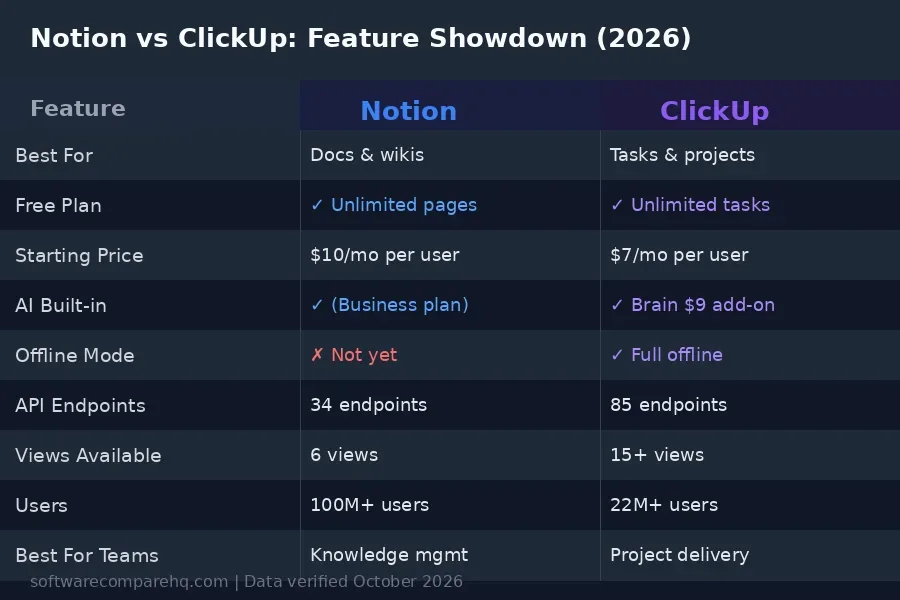
By the numbers: Notion hit 100 million users and a $10 billion valuation. It’s one of the fastest-growing SaaS tools in history. That growth didn’t happen because it’s good at task management — it happened because it made documentation feel alive.
Pricing: Free tier available. Plus plan is $10/user/month (billed annually). Business plan is $18/user/month.

What ClickUp Actually Is
ClickUp launched in 2017 with one mission: replace every other productivity app.
That’s a bold claim. They’ve mostly backed it up.
ClickUp is a project management platform first. Tasks, subtasks, dependencies, Gantt charts, time tracking, workload views, sprints, automations — this is ClickUp’s native territory. It added Docs later (and they’re solid), but the DNA of the product is task execution and team accountability.
This makes ClickUp extraordinary for:
- Agile and Scrum teams
- Cross-functional project management
- Tracking who’s doing what and when
- Client work with external deliverables
- Teams that live and die by deadlines
By the numbers: ClickUp has 22 million users across 4 million teams. In 2026, they launched ClickUp 4.0 with built-in chat — making a real push to replace Slack alongside everything else.
Pricing: Free forever plan available. Unlimited plan is $7/user/month. Business plan is $12/user/month (billed annually).
Notion vs ClickUp: Feature-by-Feature Breakdown
Task Management
ClickUp wins here. It’s not close.
ClickUp has 15+ views: List, Board, Gantt, Timeline, Calendar, Workload, Map, and more. Tasks have native subtasks, dependencies, custom statuses, priorities, time estimates, and time tracking. You can set recurring tasks, create automations based on status changes, and build entire sprint workflows without a single workaround.
Notion has tasks — you can build a task database that works pretty well — but it requires setup. Out of the box, Notion doesn’t know what a “task” is. You’re building the system yourself. For power users who want exactly what they want, that flexibility is a feature. For teams who need to onboard fast, it’s a headache.
Winner: ClickUp
Document & Wiki Management
Notion wins here. Significantly.
Notion was built around the document. Nested pages, linked databases, bidirectional references, rich embeds, collapsible sections — the reading and writing experience in Notion is genuinely beautiful.
ClickUp Docs is solid. It works. You can create wikis, SOPs, and documentation inside ClickUp and link them directly to tasks. But the editing experience isn’t as polished, and the organizational depth isn’t as deep.
If your team’s primary work product is documentation — a SaaS company with extensive help docs, a content team with SOPs, a startup building an internal knowledge base — Notion is the right choice.
Winner: Notion
Project Management & Gantt Charts
ClickUp wins.
Native Gantt charts. Native timeline views. Task dependencies with drag-and-drop. Critical path visualization. ClickUp handles complex project management that would require extensive workarounds in Notion.
Notion users often build project management systems using databases and linked views — and creative people have built genuinely impressive systems. But you’re building the car from parts, not driving one off the lot.
Winner: ClickUp
AI Features
Closer than you’d expect.
ClickUp Brain launched as an AI add-on at $9/user/month. It does AI task creation, meeting summaries, document writing, and natural language search across your entire ClickUp workspace.
Notion AI is bundled into the Business plan (from May 2025). It writes, summarizes, translates, fills databases, and — importantly — it understands Notion’s block and database structure natively, which makes it feel more integrated.
For most teams: Notion AI has the edge on document generation. ClickUp Brain has the edge on task-related AI (auto-generating tasks from meeting notes, for example).
Winner: Tie (depends on use case)
Performance
Independent testing shows:
- Notion loads pages 38% faster on average
- ClickUp completes task operations 33% faster
Both apps have had performance issues at scale. Notion’s large databases can get slow. ClickUp’s feature-rich views can lag on lower-end hardware. For most teams under 50 people, performance won’t be a deciding factor.
Winner: Tie
Integrations & API
ClickUp has the edge.
ClickUp offers 85+ native integrations and a robust API with extensive documentation. Notion has 34 native integrations — solid but less comprehensive. Both integrate with Slack, Google Drive, GitHub, Figma, and Zapier. ClickUp additionally has native time-tracking integrations (Harvest, Toggl) that matter for agencies and client work.
Winner: ClickUp
Pricing Value
ClickUp is cheaper at every tier. Notion’s AI being bundled into Business is a nice value move, but ClickUp’s base pricing is hard to beat.
Winner: ClickUp on price
The Real Question: Which One Fits Your Team?
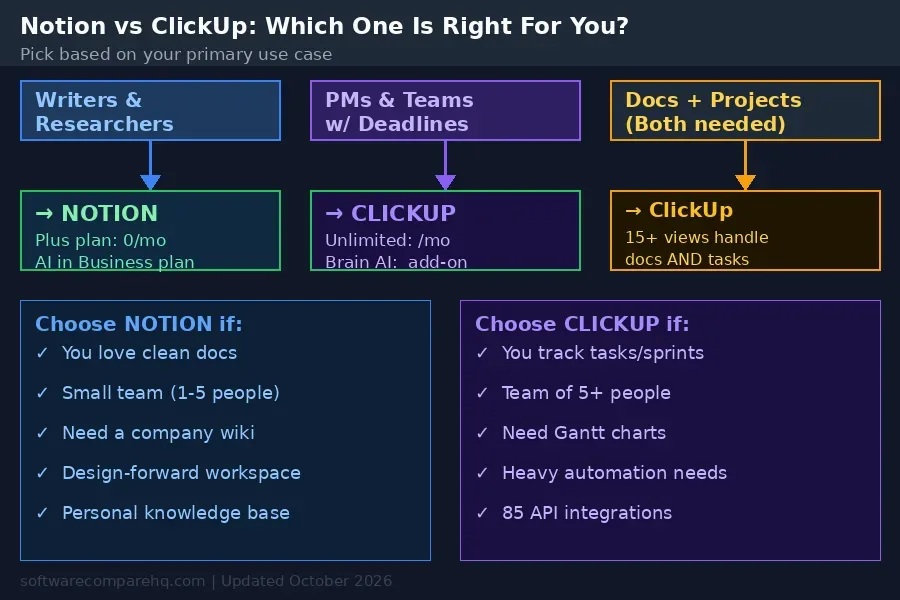
Stop reading feature lists. Ask these questions instead:
What does your team produce most?
- Mostly documents, wikis, and notes → Notion
- Mostly tasks, projects, and deliverables → ClickUp
How technical is your team?
- Comfortable building systems from scratch → Notion
- Needs structure out of the box → ClickUp
Are you replacing another tool?
- Migrating from Asana, Jira, or Monday → ClickUp
- Migrating from Confluence or Evernote → Notion
Solo user or team?
- Solo knowledge worker or creator → Notion (especially the free tier)
- Team with multiple projects and owners → ClickUp
Who Should Use Notion
- Founders and solo operators who want a second brain
- Content teams managing editorial calendars and SOPs
- Product teams building specs and roadmaps as living documents
- Students and researchers doing personal knowledge management
- Startups who want everything in one flexible document workspace
If you’re evaluating Notion specifically for personal knowledge management, it’s also worth comparing Notion vs Obsidian — Obsidian is the stronger choice for local-first, link-heavy solo knowledge bases.
Who Should Use ClickUp
- Operations teams with complex multi-step projects
- Agencies managing multiple clients and deliverables
- Engineering teams running sprints with dependencies
- Sales teams tracking pipeline stages (ClickUp has CRM views)
- Any team where “who’s responsible for what, by when” is the daily question
My Verdict
I was like, “Why can’t one tool just be both?”
The answer: ClickUp is trying. And it’s getting closer. The Docs feature is real. ClickUp Brain is improving. If you want one tool that handles 80% of both worlds, ClickUp gets you there.
But if documentation is your core product — if how your team captures and shares knowledge determines your competitive advantage — Notion isn’t beaten yet. The writing experience, the bidirectional links, the block-level structure: these details add up to something ClickUp hasn’t fully replicated.
My recommendation:
- Default to ClickUp for teams. It’s cheaper, more powerful for project management, and improving fast.
- Default to Notion for knowledge workers and solo operators. It’s flexible, beautiful, and the best personal productivity tool available.
If ClickUp feels like too much for your team’s current needs, we’ve tested and ranked the best ClickUp alternatives to help you find a lighter-weight fit.
Both have free tiers. Test them. Your team will tell you which one they actually use.
That’s the only way to know.
Rooting for you.
Frequently Asked Questions
Can you use Notion and ClickUp together?
Yes, and some teams do. They use Notion as the knowledge base and ClickUp for task execution. There’s even a Zapier integration to connect them. But managing two tools adds overhead — start with one and add the second only if there’s a clear need.
Is Notion better than ClickUp for project management?
No. ClickUp is purpose-built for project management with native Gantt charts, dependencies, sprints, and time tracking. Notion can be configured for project management, but it requires significant setup and doesn’t match ClickUp’s depth out of the box.
Is ClickUp better than Notion for personal use?
It depends on your style. Notion’s free tier is more generous for solo users, and the document-centric approach works better for personal knowledge management. ClickUp’s free tier is powerful but designed more for team workflows.
Which is easier to learn, Notion or ClickUp?
Notion has a lower initial learning curve but a high ceiling for complexity. ClickUp has more features to navigate up front but strong onboarding templates and a structured hierarchy. Both take 1–2 weeks to feel comfortable with.
Does Notion have time tracking?
Not natively. You’d need an integration like Harvest or Toggl via Zapier. ClickUp has native time tracking built in — a real advantage for agencies, consultants, and any team that bills by the hour.
Pick the one that matches how your team actually works. Then use it consistently for 90 days before deciding it’s not working.
That’s the only way to know.
Rooting for you.