Comparisons
HubSpot vs Mailchimp for Email Marketing (2026): Which One Is Right for You?
{ "@context": "https://schema.org", "@type": "Article", "headline": "HubSpot vs Mailchimp for Email Marketing (2026): Which One Is Right for You?", "description": "HubSpot vs Mailchimp compared on pricing, automation, CRM, deliverability, and templates for 2026. Know which email marketing tool fits your business.", "author": {"@type": "Organization", "name": "SoftwareCompareHQ"}, "publisher": {"@type": "Organization", "name": "SoftwareCompareHQ", "url": "https://softwarecomparehq.com"}, "datePublished": "2026-10-24", […]
⚡ Bottom Line Up Front
Choose HubSpot if you have a sales team, need CRM-connected email flows, or want to run advanced multi-step automations. Choose Mailchimp if you’re a small business or solo creator who just wants to send great emails without the complexity — or price tag — of a full marketing suite.
The Quick Verdict
You’re comparing two of the most popular email marketing platforms out there — and they’re built for different users.
HubSpot is a full marketing suite. Email is one piece of it. If you want CRM records, deal tracking, marketing automation workflows, and sales alignment — all in one place — HubSpot is built for that.
Mailchimp is the original email marketing platform. It’s simpler, faster to get started with, and at smaller list sizes, it’s cheaper. If email is your primary channel and you don’t need a built-in CRM, Mailchimp gets out of your way.
The decision usually comes down to one question: Are you running email as a standalone channel, or as part of a bigger sales and marketing engine?
What Is HubSpot Marketing Hub?
HubSpot started as a CRM and expanded into a full marketing, sales, and service platform. Marketing Hub is its marketing arm — and email is one of dozens of tools inside it.
What makes HubSpot different is the CRM-first approach. Every contact who opens your email, clicks a link, or visits your site is tracked in a central database. Your sales team can see what content that lead engaged with before a call. Your email automations can trigger based on CRM properties like deal stage or lifecycle stage.
HubSpot runs on a free tier — but the paid features start at $20/month (Marketing Hub Starter).
What Is Mailchimp?
Mailchimp launched in 2001 as a simple email newsletter tool and still dominates the small business market. Over the years it’s added automations, landing pages, a website builder, and a basic CRM — but email remains its core strength.
In 2026, Mailchimp has over 13 million users, the largest user base of any email marketing platform. That scale matters for deliverability, template variety, and integration support.
Mailchimp starts free for up to 500 contacts and 1,000 monthly sends. The Essentials plan starts at $13/month.

Feature Comparison at a Glance
| Feature | HubSpot | Mailchimp |
|---|---|---|
| Built-in CRM | ✅ Full CRM | ⚠️ Basic only |
| Email Builder | ✅ Drag & drop + AI | ✅ Drag & drop + AI |
| Marketing Automation | ✅ Advanced workflows | ✅ Customer Journeys |
| A/B Testing | ✅ Yes | ✅ Yes |
| Advanced Segmentation | ✅ Yes | ✅ Yes |
| Landing Pages | ✅ Yes | ✅ Yes |
| Free Plan | ✅ 2,000 sends/mo | ✅ 500 contacts |
| E-commerce Integration | ⚠️ Via integrations | ✅ Native Shopify |
| Sales Pipeline | ✅ Built-in | ❌ No |
| Revenue Attribution | ✅ Yes | ⚠️ E-commerce only |
Email Builder & Templates
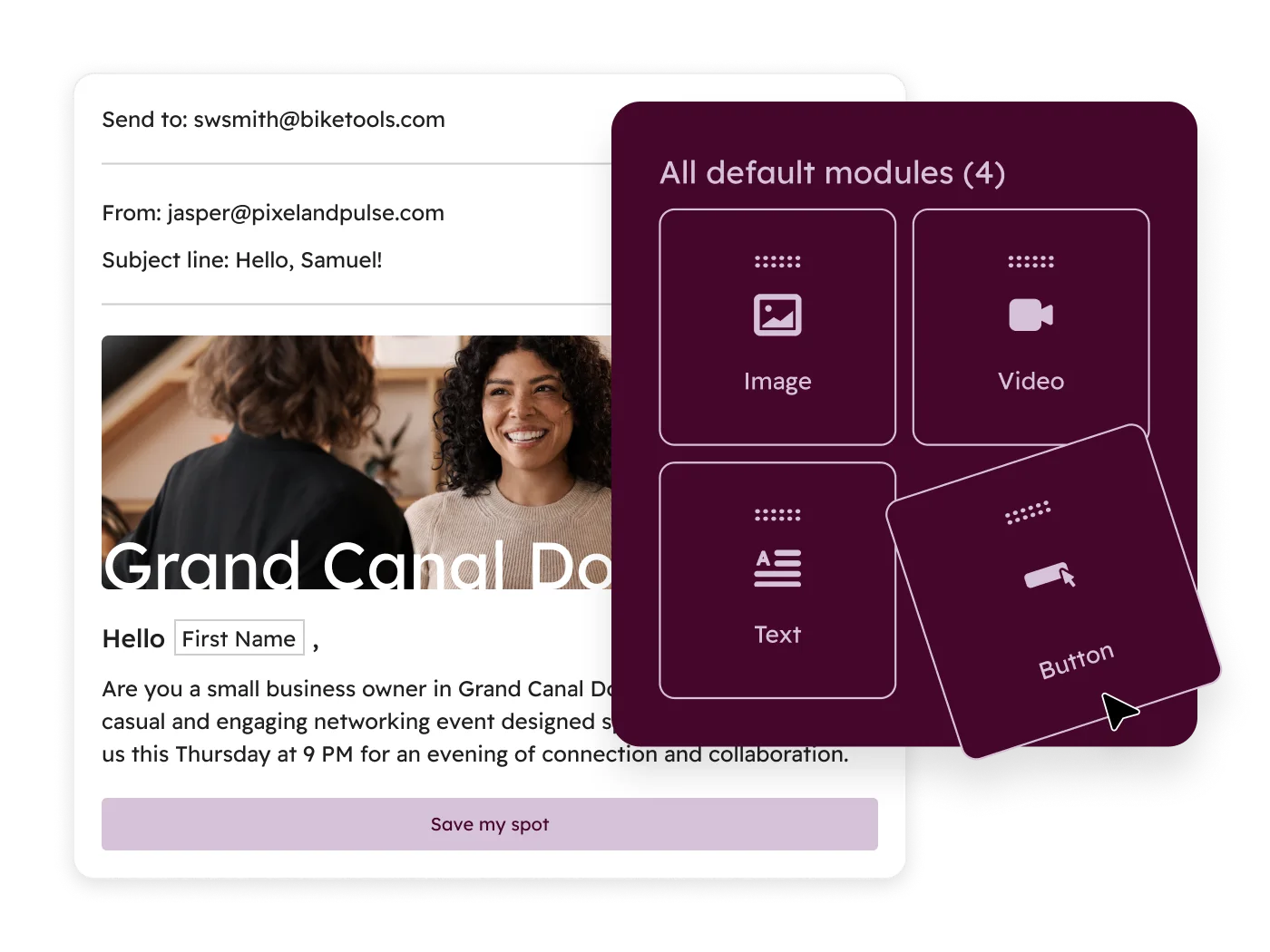
Both platforms have solid drag-and-drop email builders. In 2026, both also added AI copy generation — you can prompt either tool to write email subject lines and body copy for you.
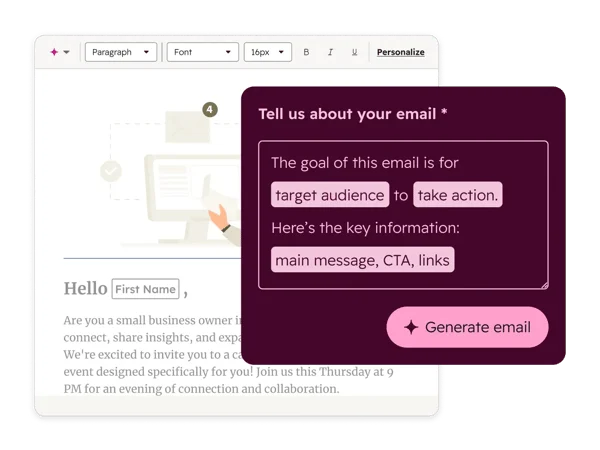
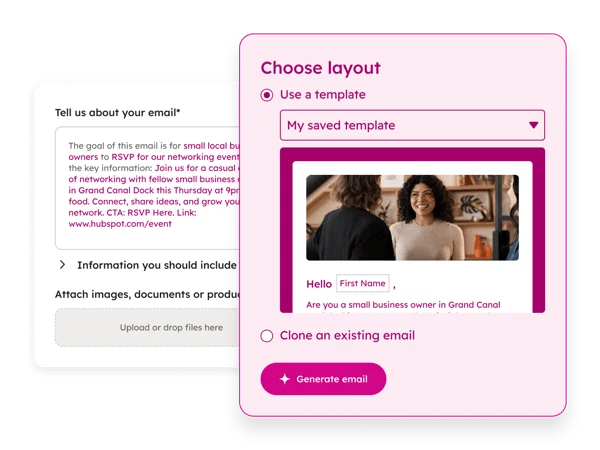
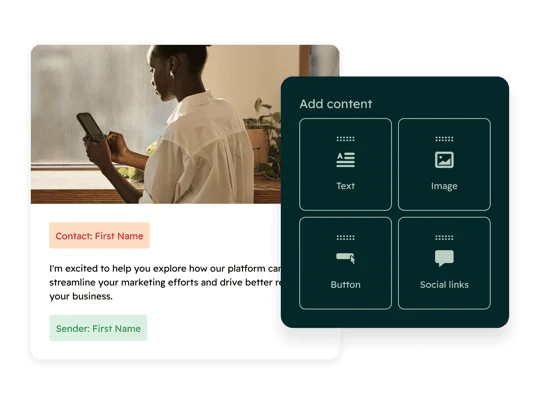
HubSpot’s email builder is clean and flexible. You get 100+ templates organized by goal (welcome, promotion, newsletter). The AI assistant generates full email campaigns from a short prompt. One standout: you can personalize emails with any CRM property — so “Hey [first name], you last visited [company’s pricing page]” is genuinely easy to set up.
Mailchimp’s email builder has been around longer and it shows — it’s extremely polished and beginner-friendly. The Creative Assistant uses AI to generate on-brand templates based on your website’s colors and logo. Mailchimp also offers 100+ templates and a more intuitive editing experience for non-designers.
Edge: Mailchimp for ease of use and design polish. HubSpot for CRM-powered personalization.
Marketing Automation
This is where the gap between HubSpot and Mailchimp becomes real.
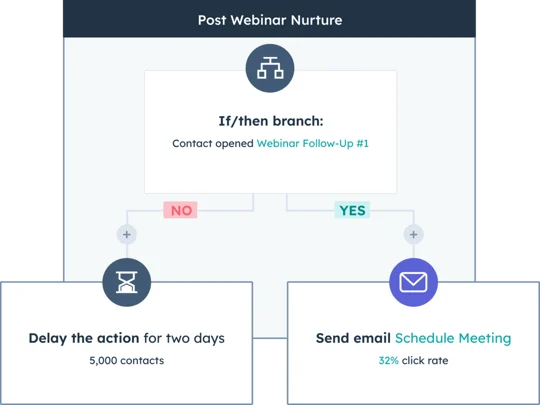
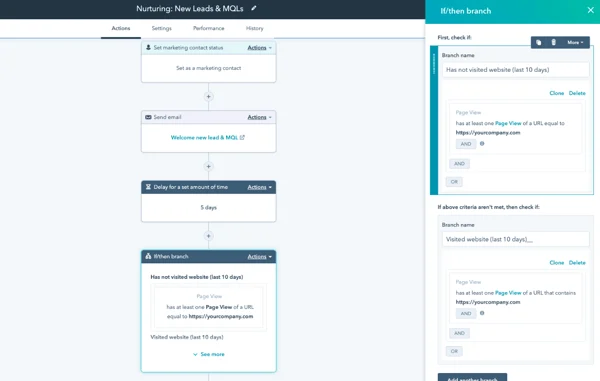
HubSpot’s workflow builder is one of the most powerful in the industry. You can trigger automations based on any CRM event — a lead fills out a form, a deal moves stages, a contact property changes. You can branch by dozens of conditions, delay by time or action, and update contact records, create tasks, or notify your sales team — all within one workflow.
If you want to extend either platform’s automation into third-party apps, see our comparison of Zapier vs Make for workflow automation — both integrate cleanly with HubSpot and Mailchimp.
Mailchimp’s Customer Journey builder lets you create multi-step automations visually. It’s improved significantly — you can set triggers (new subscriber, purchase, birthday), add email steps, and branch based on open/click behavior.

For e-commerce specifically, Mailchimp’s native Shopify and WooCommerce integrations let you trigger abandoned cart emails, post-purchase sequences, and win-back campaigns without any third-party connectors. That’s a meaningful advantage for online stores.
Edge: HubSpot for complex B2B automation. Mailchimp for e-commerce automation out of the box.
CRM Integration
This is HubSpot’s biggest advantage — and it’s not close.
HubSpot’s CRM is built in. Every contact, every email interaction, every page view, every deal is stored in a unified database. Your email marketing and your sales process live in the same system. When a prospect opens your nurture email, your sales rep can see it in the contact timeline and follow up at exactly the right moment.
We covered this in detail in our HubSpot vs Salesforce comparison — the short version is that HubSpot’s free CRM alone is more capable than what most SMBs actually need.
Mailchimp has audience management tools — you can tag contacts, create segments, and see purchase history if you’re connected to an e-commerce store. But it’s not a CRM. There’s no deal pipeline, no contact activity log across channels, no sales rep assignment.
If your list is 10,000 newsletter subscribers, Mailchimp’s contact management is fine. If those 10,000 contacts are leads you’re trying to convert through a sales process — you need a real CRM, and HubSpot has one built in.
Edge: HubSpot by a wide margin.
Analytics & Reporting
Both platforms show you standard email metrics: open rate, click rate, unsubscribes, bounces. But HubSpot goes significantly deeper.
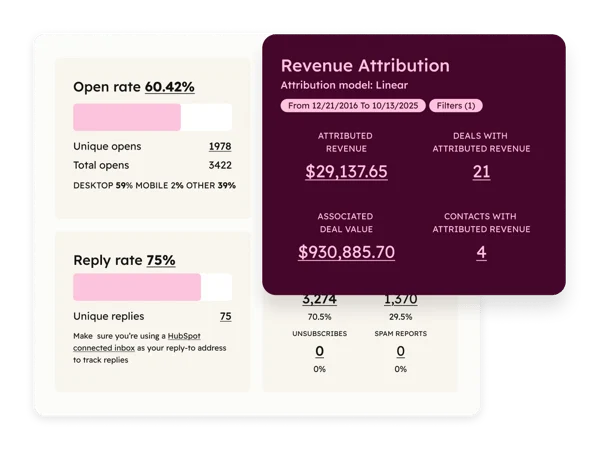
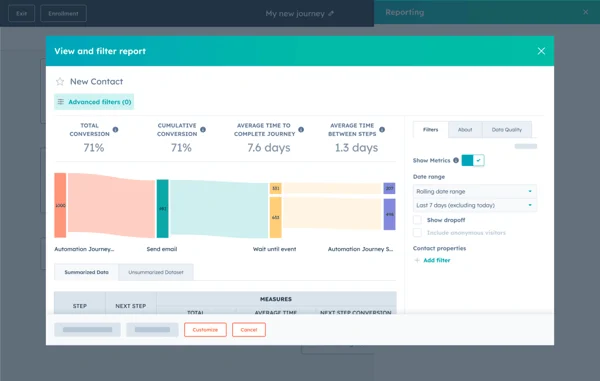
HubSpot’s reporting connects email performance to revenue. You can see which email sequences produced the most pipeline, which contacts converted after a specific email, and how email touches influenced closed deals. If you need to prove email ROI to leadership in a B2B company, this capability is invaluable.
Mailchimp’s analytics are excellent for what it’s designed to do. You get audience growth reports, campaign performance comparisons, click maps, and e-commerce revenue tracking when connected to a store. It’s easy to read and act on.
Edge: HubSpot for B2B revenue attribution. Mailchimp for e-commerce revenue tracking.
Pricing Compared
| Plan | HubSpot | Mailchimp |
|---|---|---|
| Free | 2,000 sends/mo, HubSpot branding | 500 contacts, 1,000 sends/mo |
| Entry Paid | $20/mo — Starter, 1,000 contacts | $13/mo — Essentials, 500 contacts |
| Mid Tier | $890/mo — Professional, 2,000 contacts | $20/mo — Standard, 500 contacts |
| Premium / Enterprise | $3,600/mo — Enterprise | $350/mo — Premium, 10,000 contacts |
Here’s what the table doesn’t show: HubSpot’s Marketing Hub Professional at $890/month includes features that would cost $400–600/month in separate tools — a CRM, advanced automation, landing pages, A/B testing, and revenue reporting. For a company already spending across multiple marketing tools, consolidating into HubSpot Professional often pays for itself.
Mailchimp’s pricing is contact-based and scales linearly. At 50,000 contacts the Premium plan runs about $350/month — still less than HubSpot Professional. But you also don’t get the CRM, deal pipeline, or cross-channel attribution. Decide which features you actually need before you decide which is “cheaper.”
Deliverability
Both platforms maintain strong deliverability. Industry benchmarks put HubSpot and Mailchimp at 95%+ inbox placement rates in 2026.
Mailchimp has a slight edge in reputation — it’s been the dominant email marketing platform for two decades and ISPs recognize its sending infrastructure. That matters especially when you’re emailing cold or mixed-engagement audiences.
HubSpot’s deliverability is excellent when you’re emailing opted-in CRM contacts — people who’ve already interacted with your business. For transactional and marketing emails to warm audiences, HubSpot performs at par with Mailchimp.
If your #1 concern is deliverability to cold audiences, neither platform is designed for that. Both are optimized for opted-in subscriber lists, and both do it well.
Who Should Use Each Tool?
Choose HubSpot if you:
- Have a sales team that needs to see email activity in a shared CRM
- Want to connect email marketing outcomes to pipeline and revenue
- Need complex multi-step automations with CRM-based triggers
- Are already using HubSpot CRM and want to add marketing workflows
- Run B2B campaigns where lead scoring and lifecycle tracking matter
Choose Mailchimp if you:
- Run a small business or e-commerce store where email is your main channel
- Want to start quickly without a steep learning curve
- Have a Shopify or WooCommerce store and want native abandoned cart flows
- Don’t need a full CRM and just want clean, beautiful email campaigns
- Are also comparing Mailchimp vs Kit (ConvertKit) — Mailchimp has the larger template library and broader integrations
Final Verdict
HubSpot and Mailchimp aren’t really competitors — they serve different buyers.
If you’re a B2B company with a sales team, more than 1,000 contacts in a pipeline, and a need to track email’s impact on revenue — HubSpot is the clear choice. The CRM integration alone justifies the higher price.
If you’re a blogger, e-commerce brand, or small service business that wants to send great emails to your list without the complexity of a full marketing suite — Mailchimp is perfectly built for you. It’s easier, cheaper at smaller scales, and the deliverability is top-tier.
The only genuinely hard choice is for a growing startup with 2,000–5,000 contacts who might need CRM features soon but aren’t sure yet. In that case: start with Mailchimp’s Standard plan and migrate when your sales team starts asking for CRM visibility. HubSpot makes the import process straightforward.
Frequently Asked Questions
Is HubSpot better than Mailchimp for email marketing?
HubSpot is better if you need deep CRM integration, multi-step automation, and revenue attribution. Mailchimp is better if you want simple email marketing at a lower price with excellent deliverability for non-CRM use cases.
Can I use HubSpot for free email marketing?
Yes. HubSpot’s free plan includes up to 2,000 email sends per month, basic templates, and CRM integration. The catch: HubSpot branding appears on all emails in the free plan.
Does Mailchimp have CRM features?
Mailchimp includes basic audience management and contact profiles, but it’s not a full CRM. If you need a sales pipeline with shared contact history, HubSpot’s built-in CRM is significantly more capable.
Which has better email deliverability — HubSpot or Mailchimp?
Both achieve 95%+ inbox placement rates. Mailchimp has a slight edge for cold or mixed audiences due to its long history as a dedicated email platform. HubSpot performs equally well for opted-in CRM contacts.
Is Mailchimp cheaper than HubSpot?
At entry level, yes — Mailchimp starts at $13/month versus HubSpot’s $20/month. But pricing scales quickly with list size on both platforms, and HubSpot’s Professional plan bundles features that would otherwise cost $400–600/month across separate tools. Calculate total cost of your full marketing stack before deciding.