Comparisons
Miro vs Mural for Remote Teams (2026): Which Is Better?
We tested both tools across product planning, design sprints, and async brainstorms. Miro wins for most remote teams — but Mural is better for Microsoft-first organizations and intensive workshops. Here's exactly when to choose each.
Here’s the thing about picking between Miro and Mural: most remote teams choose the wrong one.
They pick based on a demo or a free trial, without understanding what each tool is actually optimized for. Then six months later, they’re asking why collaboration feels clunky.
I’ve tested both tools across product planning, design sprints, and async brainstorms — and I can tell you exactly which one wins and when the other one is the right call.
Short answer: Miro wins for most remote teams. Bigger template library (7,000+ vs. 250+), more integrations (250+), and a rapidly evolving AI toolkit that includes MCP support and AI agents. Mural is the stronger pick if your team lives inside Microsoft 365 or runs intensive, facilitator-led workshops.
Let’s break it down.
- Quick Comparison: Miro vs. Mural
- Miro Deep Dive
- Mural Deep Dive
- Head-to-Head: What Actually Matters
- Who Should Choose Miro
- Who Should Choose Mural
- Verdict
- FAQ
Quick Comparison: Miro vs. Mural
| Feature | Miro | Mural |
|---|---|---|
| Free plan | Yes (3 boards) | Yes (3 murals) |
| Paid plans (annual) | From $8/member/mo | From $9.99/member/mo |
| Templates | 7,000+ | 250+ |
| Integrations | 250+ | 50+ |
| AI features | Yes (MCP, AI agents, AI workflows) | Yes (Facilitation AI) |
| Microsoft 365 integration | Basic | Deep (Teams-native) |
| Facilitation tools | Good | Excellent (Facilitation Superpowers) |
| Best for | Most remote teams | Microsoft-heavy orgs, workshops |
Miro Deep Dive
Miro launched in 2011 as RealtimeBoard. Today it’s the market leader in visual collaboration with over 80 million users. That scale matters: more community templates, more integrations, and a faster product roadmap.
The Canvas Experience
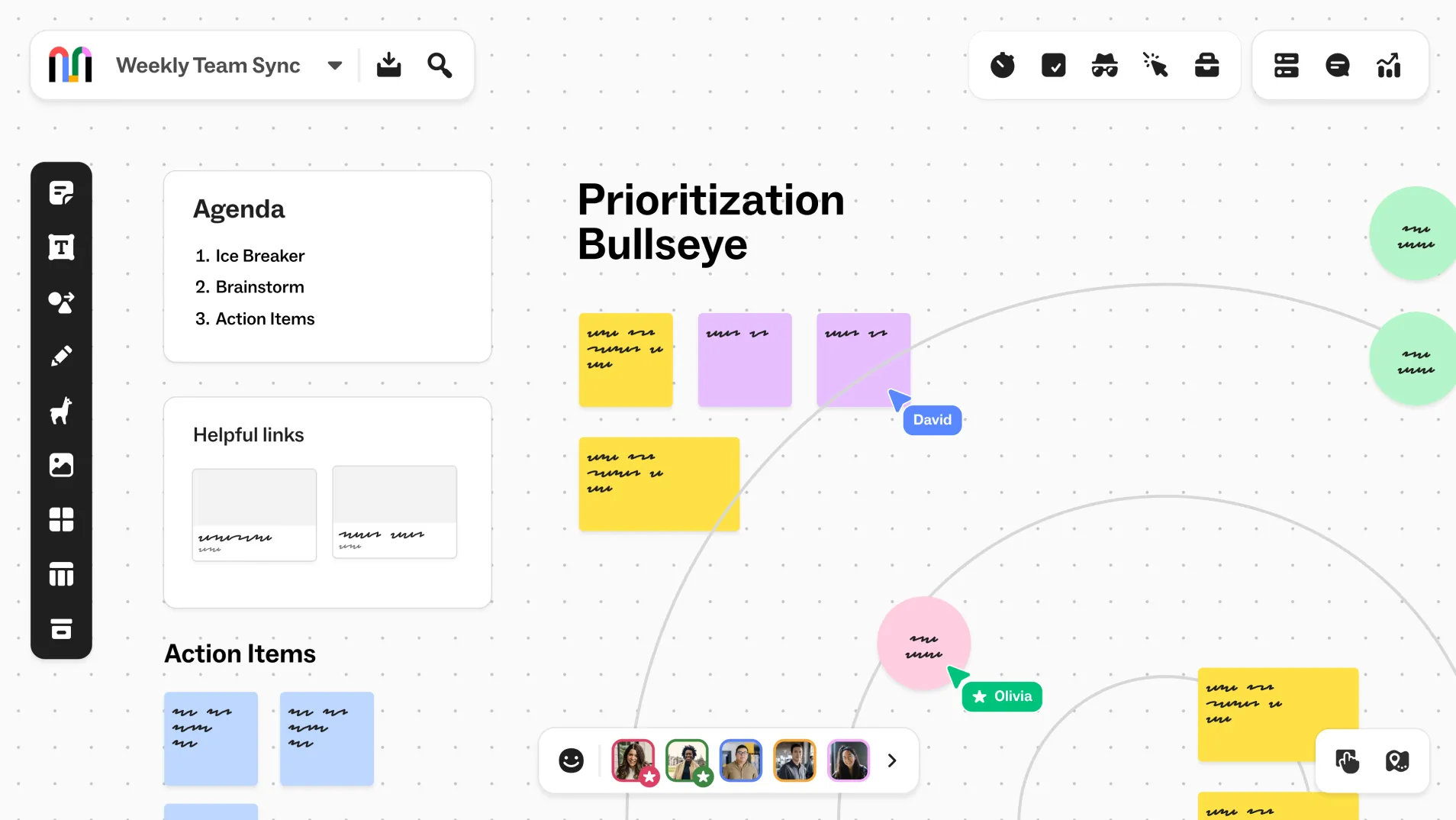
Miro’s canvas is fast. Seriously fast. Even with 50+ objects loaded, there’s no lag. You get the full infinite whiteboard: freehand drawing, sticky notes, shapes, connectors, text, images, embedded content.
The standout real-time collaboration feature: cursor trails. You see exactly where teammates are pointing, can follow their cursor, or use “Follow me” mode to bring everyone’s view to yours. Small thing. Huge difference in live workshops.
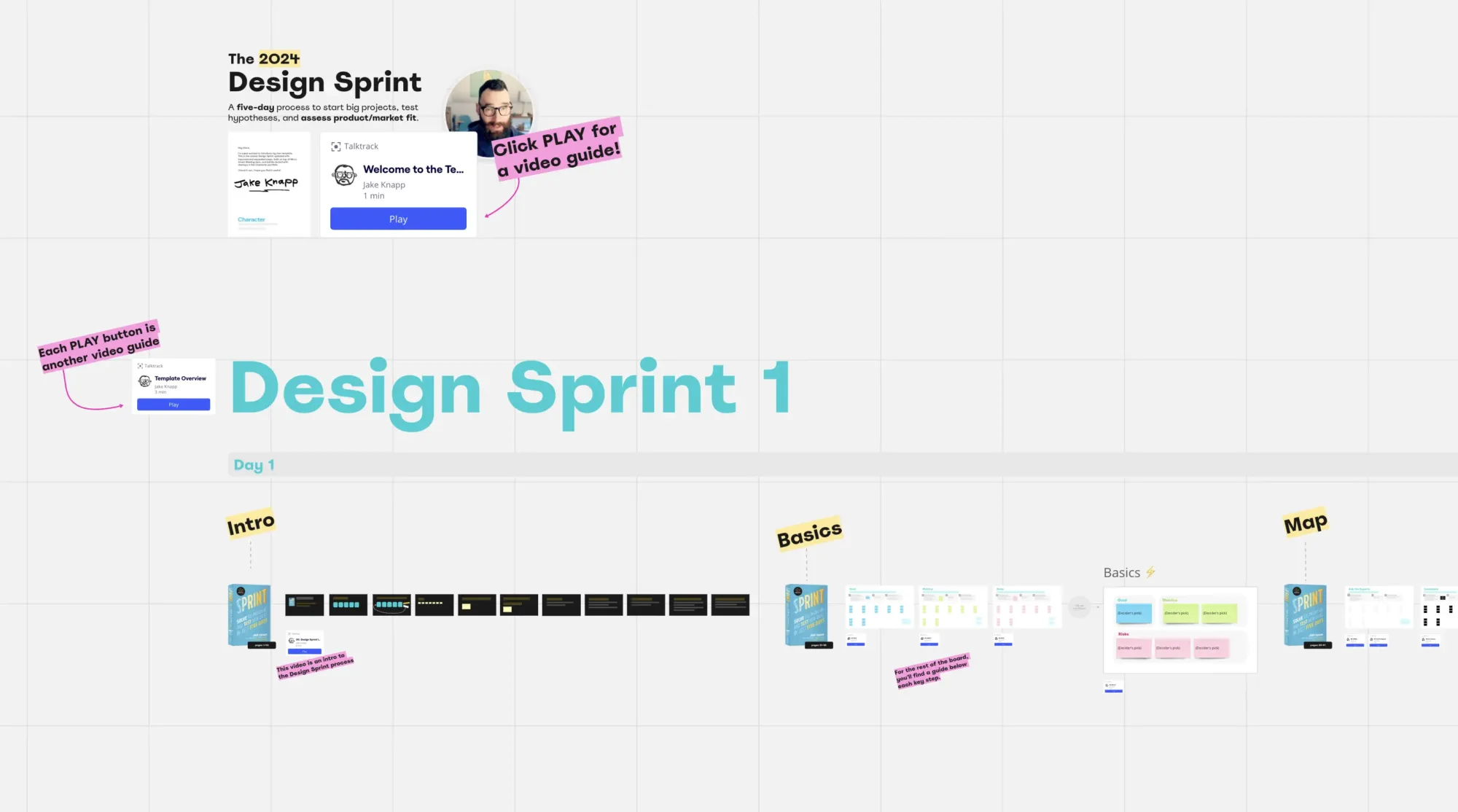
The 7,000+ template library is Miro’s biggest moat. Need a customer journey map? Done. OKR planning board? Yep. Design sprint framework? Jake Knapp (inventor of the Design Sprint) has an official Miro template.
AI Features: Where Miro Is Pulling Ahead
This is the category that’s changed the most in 2026. Miro has gone all-in on AI.
Miro AI isn’t a chatbot bolted onto a whiteboard. It’s deeply integrated.

- AI Sidekick: An AI facilitator that generates agenda items, synthesizes sticky notes, and suggests next steps — right on the board.
- MCP support: Miro now connects to external AI tools and agents via the Model Context Protocol. That’s enterprise-grade AI extensibility most collaboration tools don’t have yet.
- AI workflows: Automate repetitive board tasks — summarize a brainstorm, categorize inputs, generate options from constraints.


Diagramming and Technical Documentation
If your team does architecture diagrams, flowcharts, or technical docs, Miro wins by a mile. Native Mermaid diagram support means engineers can write code and get a diagram rendered directly on the board.
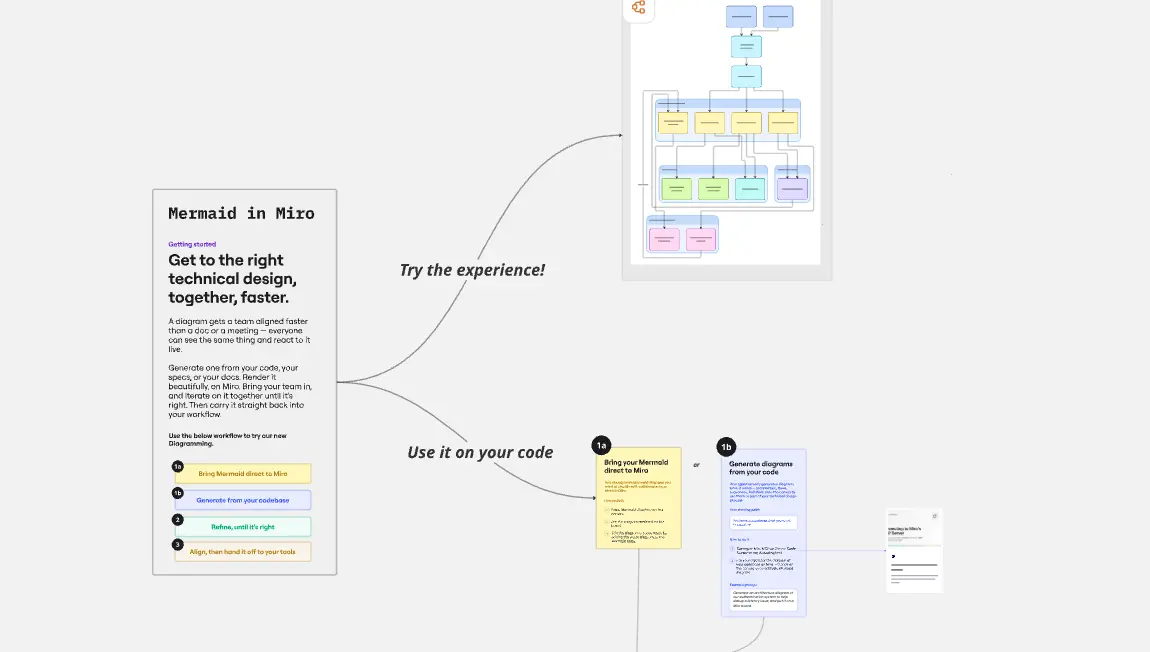
Write a sequence diagram in code, have it render visually. No other visual collaboration tool does this out of the box. For engineering teams, this alone can justify the choice.
Miro Integrations: 250+
Miro plugs into virtually every tool remote teams use:
- Jira (two-way sync — changes in Jira update on the board)
- GitHub, GitLab, Azure DevOps
- Slack, Microsoft Teams, Google Meet, Zoom
- Figma, Notion, Confluence, Asana, Linear
- Zapier, Make (for custom workflows)
If you’re evaluating team communication tools alongside this decision, see our breakdowns of Slack vs. Microsoft Teams and Zoom vs. Google Meet.
Miro Pricing (as of November 2026)
- Free: $0 — 3 boards, unlimited team members
- Starter: $8/member/mo (billed annually) — unlimited boards, basic integrations
- Business: $20/member/mo (billed annually) — SSO, Jira two-way sync, advanced sharing
- Enterprise: Custom pricing — advanced security, compliance, dedicated CSM
See Miro’s current pricing page for the most up-to-date details.
Miro Pros and Cons
Pros:
- 7,000+ templates — the biggest library available
- Best-in-class AI features (MCP, agents, Sidekick)
- Mermaid diagramming for engineering teams
- 250+ integrations covering every major tool
- Fast, responsive canvas even with complex boards
Cons:
- Can feel overwhelming for simple use cases
- Microsoft 365 integration is functional but not as deep as Mural’s
- Business plan at $20/member/mo adds up for large teams
Mural Deep Dive
Mural also launched in 2011 and carved out a specific niche: enterprise teams doing serious facilitated workshops, particularly those running on Microsoft 365.
What Mural Does Better: Facilitation Superpowers
This is where Mural genuinely wins. If you run regular workshops — retrospectives, design thinking sessions, strategic planning — Mural’s facilitation tools are the best in class.
Facilitation Superpowers is a set of tools that let the facilitator take full control of the room:
- Anonymous voting: Team members vote on sticky notes without seeing each other’s votes until the reveal
- Timer with visual countdown: On the canvas, visible to everyone
- Private mode: Participants add ideas without seeing others’ until the facilitator opens them
- Follow the facilitator: Everyone’s view locks to the facilitator’s cursor
- Summon participants: Bring everyone to your current view instantly
Miro has some of these features, but Mural’s implementation is more polished. If workshop facilitation is your primary use case, this matters a lot.
Mural Templates: 250+

Yes, 250+ is significantly fewer than Miro’s 7,000+. But here’s the nuance: Mural’s templates are curated for workshop facilitation. Every template includes facilitator notes, recommended timing, and step-by-step guides. Quality over quantity.
If you’re running your first Design Thinking workshop and need guardrails, Mural’s templates hold your hand. Miro’s templates assume you know what you’re doing.
Microsoft 365: Mural’s Biggest Differentiator
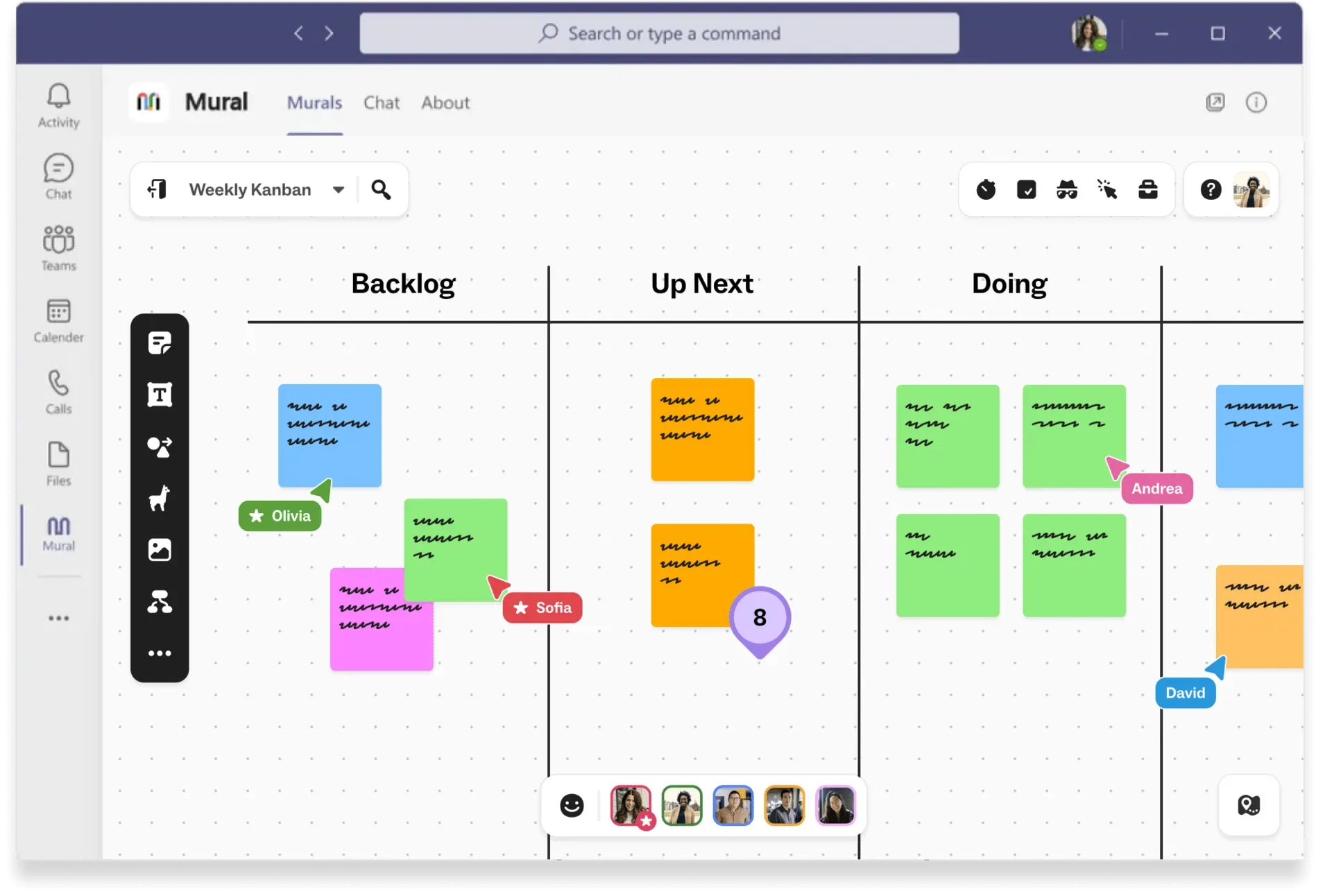
Mural runs natively inside Microsoft Teams. Not as a tab that opens a separate window — as a fully embedded, real-time whiteboard that lives within your Teams meeting.
This is not a small thing. For teams that live in Teams all day, the friction of switching to a separate app for collaboration is real. Mural eliminates it.
Beyond Teams embedding, Mural integrates with SharePoint, Outlook, Azure DevOps, and Microsoft Loop. If your company standardized on Microsoft 365, Mural is the more natural fit — which is worth considering if you’re also comparing Slack vs. Microsoft Teams for your communication stack.
Enterprise Administration
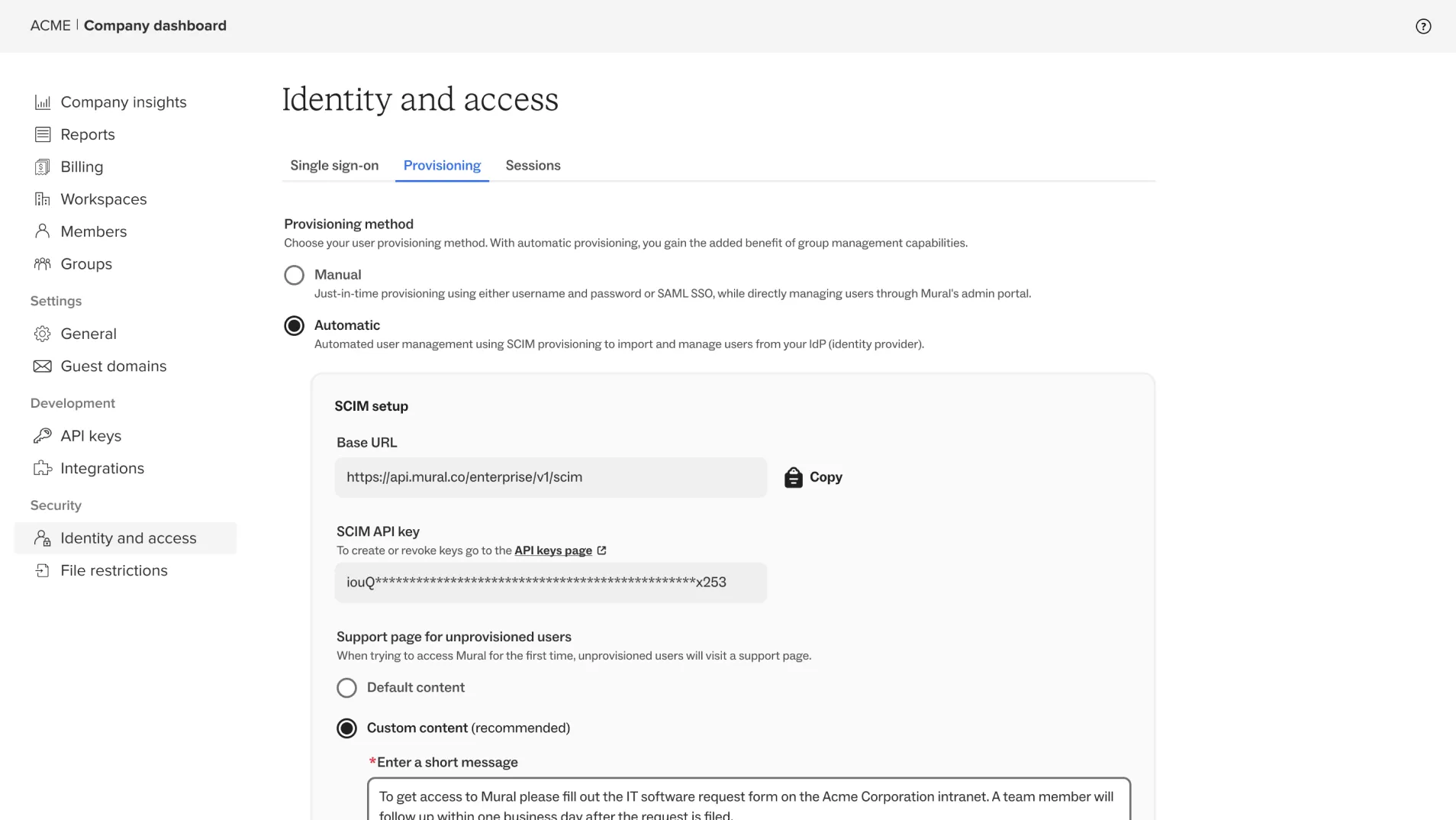
Mural has strong enterprise governance: SCIM provisioning, SSO via SAML 2.0, granular permissions, and audit logs. If you’re in a heavily governed IT environment, Mural’s compliance posture is robust.
Mural Pricing (as of November 2026)
- Free: $0 — 3 murals, unlimited members
- Team+: $9.99/member/mo (billed annually) — unlimited murals, all templates
- Business: $17.99/member/mo (billed annually) — SSO, SCIM, advanced permissions
- Enterprise: Custom pricing — dedicated support, advanced compliance
See Mural’s current pricing page for the most up-to-date details.
Mural Pros and Cons
Pros:
- Best facilitation tools in the market (Facilitation Superpowers)
- Native Microsoft Teams embedding
- Curated templates with facilitator notes and timing guides
- Strong enterprise governance and SCIM
- Business tier is cheaper than Miro’s ($17.99 vs. $20/mo)
Cons:
- 250+ templates vs. Miro’s 7,000+
- Fewer integrations (50+ vs. 250+)
- AI features lag behind Miro’s — no MCP, no AI agents
- Less useful for technical teams (no Mermaid diagramming)
Head-to-Head: What Actually Matters
Templates and Starting Points
Miro wins on volume. 7,000+ templates covering every use case vs. Mural’s 250+. For product managers, engineers, and designers who need a niche framework, Miro almost certainly has it.
Mural wins on quality for facilitation. Its templates come with facilitator guides and timing. For first-time facilitators, that scaffolding is worth a lot more than 6,750 extra templates.
AI Features in 2026
Miro wins, clearly. The combination of AI Sidekick, MCP support, AI workflows, and AI agents is 12-18 months ahead of where Mural is. If AI-augmented collaboration matters to your team (and it should), Miro is the better bet right now.
Microsoft 365 Integration
Mural wins. Running inside Teams natively isn’t a feature — it’s a whole different workflow. If your team never leaves Teams, Mural is the smarter choice.
Engineering and Technical Teams
Miro wins. Mermaid diagram support, GitHub/GitLab integrations, and architecture diagram templates make Miro the better fit for engineering orgs. See our comparison of Linear vs. Jira if you’re evaluating project tracking tools at the same time.
Price
Close. Miro Starter ($8/mo) beats Mural Team+ ($9.99/mo). But Mural Business ($17.99/mo) beats Miro Business ($20/mo). Small teams on starter plans: Miro is cheaper. Mid-market teams needing SSO and SCIM: Mural saves a bit.
Ease of Use
Mural has the edge for onboarding non-technical users. Its interface is cleaner and less overwhelming. Miro’s power comes with more complexity — not a problem if your team has a champion who knows the tool, but it’s a real ramp for teams without one.
Who Should Choose Miro
Choose Miro if:
- Your team includes engineers who need diagramming (Mermaid, architecture diagrams)
- You want maximum template coverage for every possible use case
- AI-augmented collaboration is a priority in 2026
- You need broad integration coverage (Jira two-way sync, GitHub, Figma, etc.)
- You’re not a Microsoft-first organization
- Product managers who run design sprints use frameworks like Jobs-to-be-Done or Impact Mapping
Related: if you’re evaluating project management tools alongside visual collaboration, see our Monday.com vs. Asana comparison.
Who Should Choose Mural
Choose Mural if:
- Your company standardized on Microsoft 365 — especially if Teams is your communication hub
- You run intensive, facilitator-led workshops (design thinking, agile ceremonies, strategic planning)
- Your IT team requires deep enterprise governance (SCIM provisioning, SSO, compliance)
- Your facilitators are newer and need scaffolded templates with built-in guidance
- The Business plan price point matters — $17.99/mo vs. $20/mo adds up at scale
Verdict
For most remote teams: Miro wins.
The template library advantage (7,000+ vs. 250+), the integration depth (250+ vs. 50+), and the AI feature gap make Miro the stronger default choice in 2026. The pace of Miro’s AI development — MCP support, AI agents, AI workflows — suggests that gap will only grow.
But Mural is not a runner-up. It’s the right choice for a specific profile: Microsoft-first organizations that run structured, facilitated workshops. For those teams, Mural’s native Teams embedding and Facilitation Superpowers are genuinely better than what Miro offers.
Start with Miro’s free plan (3 boards, no credit card). If you’re in a heavy Microsoft shop or facilitation is your primary use case, give Mural’s free plan a spin too. The right tool will become obvious within a week.
Either way: pick one and go deep. The teams that get the most from these tools aren’t the ones who tried both — they’re the ones who committed.
FAQ
Is Miro or Mural better for remote teams?
Miro is better for most remote teams due to its larger template library (7,000+), more integrations (250+), and more advanced AI features including MCP support and AI agents. Mural is better specifically for Microsoft 365 organizations or teams that run intensive facilitated workshops.
Can you use Miro and Mural for free?
Yes, both offer free plans. Miro’s free plan allows 3 boards with unlimited team members. Mural’s free plan allows 3 murals with unlimited members. Neither plan requires a credit card.
Which is cheaper, Miro or Mural?
Miro’s Starter plan at $8/member/month (annually) is cheaper than Mural’s Team+ at $9.99/member/month. However, Mural’s Business plan at $17.99/member/month is cheaper than Miro’s Business plan at $20/member/month.
Does Mural work inside Microsoft Teams?
Yes. Mural runs natively inside Microsoft Teams as a fully embedded whiteboard. Teams can collaborate on a Mural board without leaving their Teams meeting — one of Mural’s biggest differentiators.
Does Miro have AI features?
Yes. Miro has significantly invested in AI in 2026. Key features include AI Sidekick (an AI facilitator that generates agenda items and synthesizes sticky notes), MCP support for connecting external AI agents, and AI workflows for automating board tasks like summarization and categorization.
How many templates does Miro have compared to Mural?
Miro has 7,000+ templates covering a wide range of use cases. Mural has 250+ templates, which are more focused on workshop facilitation and include facilitator guides and timing recommendations.
Is Miro good for engineering teams?
Yes. Miro includes native Mermaid diagram support, letting engineers write diagram-as-code and render it directly on the whiteboard. It also has strong integrations with Jira, GitHub, GitLab, and Azure DevOps.
What is the difference between Miro and Mural for enterprise?
Both offer enterprise plans with SSO and SCIM. Mural’s enterprise offering is particularly strong for Microsoft 365 environments with deeper Teams integration, SharePoint embedding, and Azure AD. Miro’s enterprise plan offers more integration breadth and advanced AI features including MCP and AI agent support.