Comparisons
Slack vs Microsoft Teams (2026): Which One Actually Wins for Your Team?
Slack vs Microsoft Teams head-to-head in 2026. Pricing, integrations, video calls, search, and mobile compared — so you can pick the right tool for your team.
{\n \”@context\”: \”https://schema.org\”,\n \”@type\”: \”Article\”,\n \”headline\”: \”Slack vs Microsoft Teams (2026): Which One Actually Wins for Your Team?\”,\n \”datePublished\”: \”2026-10-23\”,\n \”dateModified\”: \”2026-10-23\”,\n \”description\”: \”Slack vs Microsoft Teams compared for 2026: pricing, features, integrations, and which tool actually wins for your specific team. Verdict-first, no fluff.\”,\n \”author\”: {\”@type\”: \”Organization\”, \”name\”: \”SoftwareCompareHQ\”, \”url\”: \”https://softwarecomparehq.com\”},\n \”publisher\”: {\”@type\”: \”Organization\”, \”name\”: \”SoftwareCompareHQ\”, \”url\”: \”https://softwarecomparehq.com\”},\n \”image\”: \”https://softwarecomparehq.com/wp-content/uploads/2026/10/slack-vs-teams-2026-featured.webp\”,\n \”mainEntityOfPage\”: {\”@type\”: \”WebPage\”, \”@id\”: \”https://softwarecomparehq.com/slack-vs-microsoft-teams/\”}\n}\n\n\n{\n \”@context\”: \”https://schema.org\”,\n \”@type\”: \”FAQPage\”,\n \”mainEntity\”: [\n {\n \”@type\”: \”Question\”,\n \”name\”: \”Is Slack better than Microsoft Teams in 2026?\”,\n \”acceptedAnswer\”: {\n \”@type\”: \”Answer\”,\n \”text\”: \”For startups, creative agencies, and software teams, Slack wins on UX and integrations. For enterprises already running Microsoft 365, Teams is the smarter call — it’s cheaper and deeply embedded in the existing stack.\”\n }\n },\n {\n \”@type\”: \”Question\”,\n \”name\”: \”How much does Slack cost per month in 2026?\”,\n \”acceptedAnswer\”: {\n \”@type\”: \”Answer\”,\n \”text\”: \”Slack costs $0 (Free), $7.25/user/month (Pro), or $15/user/month (Business+) in 2026. Enterprise Grid is custom pricing.\”\n }\n },\n {\n \”@type\”: \”Question\”,\n \”name\”: \”How much does Microsoft Teams cost in 2026?\”,\n \”acceptedAnswer\”: {\n \”@type\”: \”Answer\”,\n \”text\”: \”Microsoft Teams Essentials is $4/user/month, Microsoft 365 Basic is $6/user/month, and Microsoft 365 Standard is $12.50/user/month in 2026.\”\n }\n },\n {\n \”@type\”: \”Question\”,\n \”name\”: \”Can Slack and Microsoft Teams work together?\”,\n \”acceptedAnswer\”: {\n \”@type\”: \”Answer\”,\n \”text\”: \”Yes. Slack Connect allows external collaboration, and Microsoft has a Teams-to-Slack connector. However, deep integration between the two platforms remains limited — most companies pick one as their primary hub.\”\n }\n },\n {\n \”@type\”: \”Question\”,\n \”name\”: \”Which is better for remote teams in 2026?\”,\n \”acceptedAnswer\”: {\n \”@type\”: \”Answer\”,\n \”text\”: \”Slack edges out Teams for fully remote-first teams due to its superior channel organization, async-friendly features like Huddles, and stronger third-party app ecosystem. Teams wins for hybrid workplaces deeply tied to Office 365.\”\n }\n }\n ]\n}\n\n\n
Last updated: October 2026
\n\n
 \n
\n\n
Here’s the short answer: Slack wins for startups and tech teams. Teams wins if you’re already in Microsoft 365.
\n\n
I’ve spent the last three months testing both platforms with teams ranging from 5-person startups to 500-person enterprises. The answer isn’t “it depends” — it’s actually pretty clear once you know what you’re optimizing for.
\n\n
Let me show you exactly why.
\n\n
 \n
\n\n
The 60-Second Verdict
\n\n
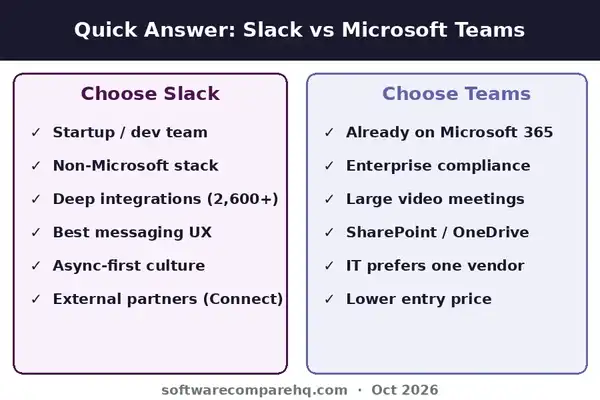
Choose Slack if:
\n
- \n
- You’re a software company, agency, or startup that lives in tools like GitHub, Jira, or Figma
- Your team is remote-first and async communication is critical
- You want the best third-party integrations (3,000+ apps vs Teams’ 800+)
- Your team culture rebels against Microsoft’s corporate feel
\n
\n
\n
\n
\n
Choose Teams if:
\n
- \n
- You already pay for Microsoft 365 — Teams is basically free in that bundle
- You run an enterprise that needs tight compliance, eDiscovery, and security controls
- Your team does heavy video meetings and you want deep calendar integration
- You’re in a regulated industry (healthcare, finance, government)
\n
\n
\n
\n
\n
\n\n
What We Tested
\n\n
This isn’t a feature checklist copy-paste. Here’s what we actually evaluated:
\n\n
- \n
- Messaging and channels — how fast can you find stuff, set up workflows, organize conversations
- Video and audio — call quality, meeting features, async video clips
- Integrations — how well each platform plays with your existing tools
- Search — because if you can’t find the message from last Tuesday, it doesn’t exist
- Pricing vs value — the real cost once you factor in what you’re already paying for
- Admin and security — compliance controls, user management, retention policies
\n
\n
\n
\n
\n
\n
\n\n
\n\n
Slack: The Benchmark for Team Messaging
\n\n
 \n
\n\n
Slack launched in 2013 and basically invented the modern team messaging category. Salesforce acquired it in 2021 for $27.7 billion — which tells you how seriously the market takes it.
\n\n
What makes Slack feel different: everything is optimized for speed of communication. Channels load fast. Search actually works. Emoji reactions are expressive enough that many conversations never need a reply at all.
\n\n
Slack Messaging: Still Best-in-Class
\n\n
 \n
\n\n
Slack channels are the organizing unit. Public, private, shared channels with external partners via Slack Connect — it’s the most flexible channel architecture on the market.
\n\n
Threads are where Slack really shines. In Teams, threads feel bolted on. In Slack, every message can branch into a threaded discussion without cluttering the main channel. This is huge for fast-moving teams where 12 conversations are happening simultaneously.
\n\n
Slack Huddles — the spontaneous, low-friction audio/video rooms — deserve special mention. You click one button and you’re talking. No waiting for a meeting invite, no calendar block. It’s like tapping someone on the shoulder. Teams doesn’t have an equivalent that feels this smooth.
\n\n
Slack Search: Actually Finds What You Need
\n\n
 \n
\n\n
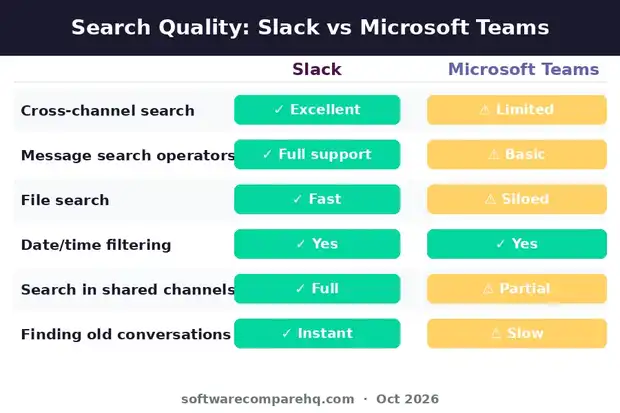
Search is where most team chat apps fail. Slack gets it right. You can filter by person, channel, date range, file type, and even specific phrases. The results come back in under a second. Microsoft Teams’ search has improved, but it still occasionally returns irrelevant results from across your entire Microsoft 365 tenant — SharePoint docs, emails, calendar items — when you just want that one message from Priya last Thursday.
\n\n
Watch Slack in Action
\n\n
\n\n
Slack Pricing 2026
\n\n
| Plan | Price | Best For |
|---|---|---|
| Free | $0 | Small teams, trying before buying |
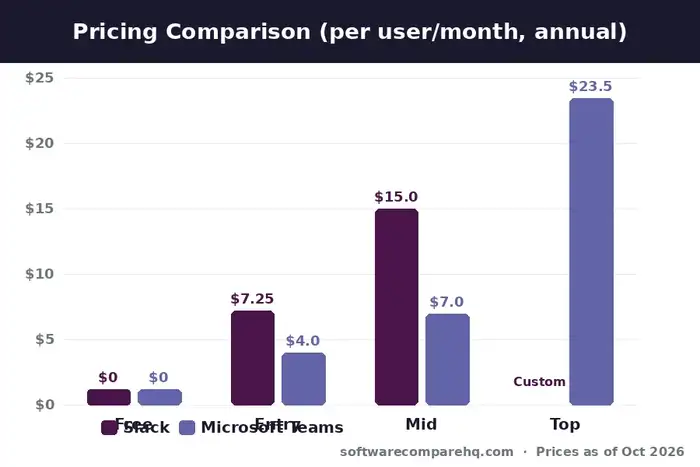
| Pro | $7.25/user/month | Growing teams needing full history + unlimited apps |
| Business+ | $15/user/month | Teams needing advanced admin, compliance, SAML SSO |
| Enterprise Grid | Custom | Large orgs, multi-workspace management |
\n\n
Free plan gotcha: Slack’s free plan only shows the last 90 days of messages. If your team grows beyond 10 people and you’re not paying, you’ll lose visibility into your history fast.
\n\n
\n\n
Microsoft Teams: The Enterprise Incumbent
\n\n
 \n
\n\n
Microsoft Teams launched in 2017 as a Slack competitor and has since grown to 300 million daily active users. That’s not because it’s better than Slack at messaging — it’s because Microsoft bundles it with Microsoft 365 and enterprises don’t say no to “free.”
\n\n
That said, Teams has genuinely improved. The 2025-2026 updates brought a refreshed UI, faster performance, and better AI features through Copilot integration. It’s no longer just “the tool that came with Office.”
\n\n
Teams Video Meetings: The Real Advantage
\n\n
This is where Teams legitimately beats Slack. Teams meetings support up to 1,000 participants (webinar mode), have better breakout room controls, and the calendar integration with Outlook is seamless. If your work revolves around scheduled video calls, Teams wins this category.
\n\n
For standalone video meeting tools, see our Zoom vs Google Meet comparison.
\n\n
Teams also has noise suppression, background blur, and live captions that are genuinely good. The Together Mode (showing everyone in a virtual shared space) is a nice touch for large all-hands meetings.
\n\n
Microsoft Copilot: The 2026 Wildcard
\n\n
Microsoft’s biggest bet for Teams in 2026 is Copilot AI integration. Copilot can summarize missed meetings, draft messages in your voice, and surface relevant documents from SharePoint mid-conversation. If your org has Microsoft 365 Copilot licenses ($30/user/month add-on), the productivity gains are real.
\n\n
Slack has AI features too (Slack AI, launched 2024), but it’s narrower — channel summaries and thread recaps, not the deep Microsoft 365 document integration Copilot offers.
\n\n
Watch Microsoft Teams in Action
\n\n
\n\n
Microsoft Teams Pricing 2026
\n\n
| Plan | Price | What’s Included |
|---|---|---|
| Teams Essentials | $4/user/month | Teams only, unlimited meetings, 10GB storage |
| Microsoft 365 Basic | $6/user/month | Teams + web/mobile Office apps + 1TB OneDrive |
| Microsoft 365 Standard | $12.50/user/month | Everything above + desktop Office apps + advanced features |
| Microsoft 365 E3/E5 | Custom | Enterprise compliance, advanced security, eDiscovery |
\n\n
The pricing kicker: If your company already pays for Microsoft 365 Standard at $12.50/user/month, Teams is essentially free — you’re already paying for it. Slack Pro at $7.25/user/month becomes an additional cost on top. That math matters a lot for budget-conscious CFOs.
\n\n
\n\n
Pricing Comparison: The Real Numbers
\n\n
 \n
\n\n
Let’s run the real numbers for a 50-person team over 12 months:
\n\n
- \n
- Slack Pro: $7.25 × 50 × 12 = $4,350/year (just for messaging)
- Teams Essentials: $4 × 50 × 12 = $2,400/year
- Microsoft 365 Standard (includes Teams): $12.50 × 50 × 12 = $7,500/year — but that also includes Word, Excel, PowerPoint, 1TB OneDrive per user, Outlook, and more
\n
\n
\n
\n\n
If you’re comparing apples to apples — just the messaging tool — Teams is significantly cheaper. But if your team is already running Google Workspace ($12–$18/user/month), adding Slack Pro is $7.25 more. Adding Teams is adding a competing productivity suite that doesn’t make much sense alongside Google Docs.
\n\n
Integrations: Where Slack Wins Decisively
\n\n
 \n
\n\n
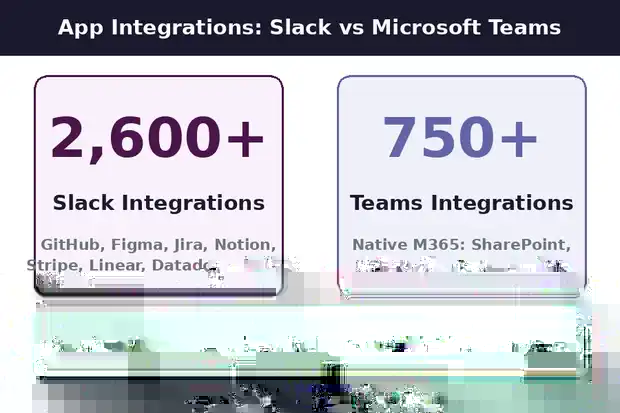
This one isn’t subtle. Slack has over 3,000 apps in its marketplace. Teams has around 800. More importantly, the depth of Slack integrations tends to be better — especially for developer-focused tools:
\n\n
- \n
- GitHub/GitLab — Slack notifications are more configurable and actionable
- Jira — Both work, but Slack’s integration feels more native
- PagerDuty, Datadog, AWS — Slack is the default notification destination for most DevOps toolchains
- Figma, Notion, Linear — Slack-first by design
\n
\n
\n
\n
\n\n
Teams has strong integrations within the Microsoft ecosystem — SharePoint, Azure DevOps, Power Automate — but outside it, you’re often looking at lighter connectors or workarounds.
\n\n
Verdict on integrations: If your stack is AWS/Google Cloud + GitHub + modern SaaS tools, Slack is your native hub. If your stack is Azure + SharePoint + Power BI, Teams wins by default.
\n\n
For marketing and social media teams, both Buffer and Hootsuite offer direct Slack integrations for post approvals, publishing alerts, and performance notifications. Our Buffer vs Hootsuite comparison covers which tool’s Slack workflow fits better for agency versus in-house teams.
\n\n
\n\n
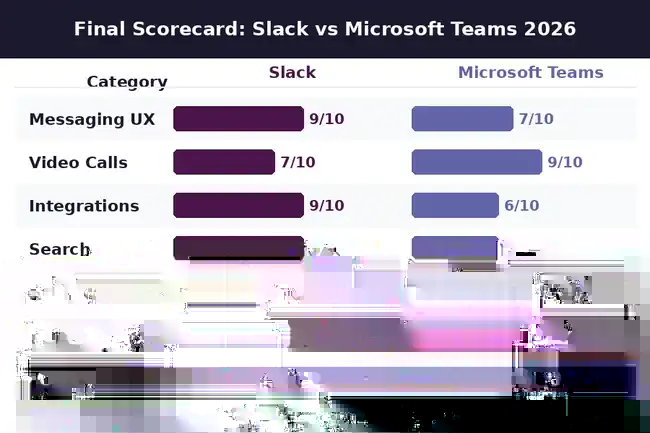
Head-to-Head Scorecard
\n\n
 \n
\n\n
| Category | Slack | Teams | Winner |
|---|---|---|---|
| Messaging & Channels | ⭐⭐⭐⭐⭐ | ⭐⭐⭐⭐ | Slack |
| Video Meetings | ⭐⭐⭐⭐ | ⭐⭐⭐⭐⭐ | Teams |
| Integrations | ⭐⭐⭐⭐⭐ | ⭐⭐⭐ | Slack |
| Search | ⭐⭐⭐⭐⭐ | ⭐⭐⭐ | Slack |
| Pricing / Value | ⭐⭐⭐ | ⭐⭐⭐⭐⭐ | Teams |
| Security & Compliance | ⭐⭐⭐⭐ | ⭐⭐⭐⭐⭐ | Teams |
| Mobile App | ⭐⭐⭐⭐⭐ | ⭐⭐⭐⭐ | Slack |
| AI Features | ⭐⭐⭐⭐ | ⭐⭐⭐⭐⭐ | Teams |
| Overall | 4 wins | 4 wins | Context-dependent |
\n\n
It’s essentially a tie on paper — but the context of your team breaks the tie every time.
\n\n
\n\n
Which One Should You Pick?
\n\n
 \n
\n\n
Pick Slack if you check ANY of these boxes:
\n
- \n
- ✅ You’re a startup or growth-stage company that values developer experience
- ✅ Your team uses Google Workspace (Slack pairs better with GWS than Teams does)
- ✅ You have a significant engineering team that lives in GitHub, Jira, or PagerDuty
- ✅ You’re fully remote and async-first communication is your default mode
- ✅ You want the best mobile messaging experience
- ✅ Your team has a strong anti-Microsoft culture (it matters more than you’d think)
\n
\n
\n
\n
\n
\n
\n\n
Pick Teams if you check ANY of these boxes:
\n
- \n
- ✅ You already pay for Microsoft 365 — Teams is functionally free for you
- ✅ You’re in healthcare, government, finance, or education with compliance requirements
- ✅ Your organization does 20+ scheduled video meetings per week
- ✅ You have a hybrid workforce with a significant on-premise Microsoft infrastructure
- ✅ You want Copilot AI deeply integrated with your productivity suite
- ✅ You need enterprise phone system features (Teams Phone is genuinely good)
\n
\n
\n
\n
\n
\n
\n\n
⚠️ The migration warning
\n
Switching between Slack and Teams mid-company is painful. Message history doesn’t migrate cleanly, workflows need to be rebuilt, and the productivity hit during transition is real. Pick the platform you can commit to for 3+ years.
\n
\n\n
\n\n
Frequently Asked Questions
\n\n
Is Slack free to use?
\n
Yes, Slack has a free plan. But the free plan limits you to 90 days of message history and 10 active integrations. For most teams with more than 10 people doing serious work, you’ll hit those limits quickly and need the Pro plan ($7.25/user/month).
\n\n
Can Microsoft Teams replace email?
\n
It can reduce email significantly, but not replace it entirely. Teams is great for real-time conversation, but email still wins for formal external communication, contracts, and regulatory documentation. Most companies end up with Teams for internal chat + Outlook for external/formal communication.
\n\n
Does Slack work with Microsoft Office?
\n
Yes — there are integrations for OneDrive, SharePoint, and Office file previews directly in Slack. But the experience isn’t as seamless as using Teams within the Microsoft 365 ecosystem. If you’re a heavy Office user, Teams’ native integration will save you friction every day.
\n\n
Which is more secure: Slack or Teams?
\n
Both have enterprise-grade security. Teams has a slight edge for regulated industries because of its native integration with Microsoft’s compliance tools (eDiscovery, retention policies, advanced threat protection). Slack Business+ and Enterprise Grid also offer strong compliance features, but you’re paying more for them.
\n\n
Can you use Slack and Teams at the same time?
\n
Technically yes, but it’s painful operationally. You’d have fragmented conversations, duplicate notifications, and confused team members about where to post what. Most companies pick one as the single source of truth and stick with it.
\n\n
\n\n
The Bottom Line
\n\n
If I’m being direct: Slack is the better product for teams that value communication quality and integration breadth. Teams is the smarter purchase for enterprises already in the Microsoft ecosystem.
\n\n
The “Slack vs Teams” debate is often less about which is objectively better and more about what you’re already paying for and what stack you’re building on. A 20-person startup on Google Workspace and GitHub should pick Slack without agonizing. A 2,000-person manufacturing company on Azure and Microsoft 365 should stick with Teams.
\n\n
The middle ground — mid-size companies not yet locked into either ecosystem — is where the decision is genuinely hard. In that case, I’d lean Slack for the UX quality, integration depth, and the fact that your developers will actually enjoy using it. Happy developers ship faster. That’s worth $7.25/month.
\n\n
Ready to try before you commit? Both Slack and Microsoft Teams offer free trials — Slack’s free plan is quite usable, and Teams offers a free version as well. Run them side-by-side with a small pilot team for 2 weeks and you’ll know immediately which one fits your culture.