Software
Zoom vs Google Meet (2026): Honest Head-to-Head Comparison
Last Updated: October 24, 2026 The short version: Zoom wins on raw features, integrations (3,000+ apps), and meeting flexibility. Google Meet wins on simplicity, free-tier call length (60 min vs 40), and seamless Google Workspace integration. If your team already lives in Google Docs and Gmail, Meet is a no-brainer. If you need breakout rooms, […]
Last Updated: October 24, 2026
The short version: Zoom wins on raw features, integrations (3,000+ apps), and meeting flexibility. Google Meet wins on simplicity, free-tier call length (60 min vs 40), and seamless Google Workspace integration. If your team already lives in Google Docs and Gmail, Meet is a no-brainer. If you need breakout rooms, webinars, or heavy third-party integrations, Zoom is worth the extra cost.
I’ve watched this debate play out in every startup Slack channel since 2020. And here’s the honest truth: there’s no universally “better” option.
But there IS a better option for your specific situation. That’s what we’re here to figure out.
We compared Zoom and Google Meet across pricing, features, AI tools, integrations, security, and real-world reliability. Here’s what we found.
Quick Comparison: Zoom vs Google Meet at a Glance

| Feature | Zoom | Google Meet |
|---|---|---|
| Free Plan Call Length | 40 minutes | 60 minutes ✓ |
| Free Plan Participants | 100 | 100 |
| Paid Starting Price | $14.16/user/month | $7/user/month ✓ |
| Free Recording | Yes (local) ✓ | Paid only |
| Breakout Rooms | All paid plans ✓ | Business Standard+ only |
| Integrations | 3,000+ apps ✓ | Google ecosystem |
| AI Meeting Assistant | AI Companion (included) | Gemini (Business Standard+) |
| G2 / Capterra Rating | 4.5 / 4.6 | — / 4.5 |
| Best For | Teams needing power features | Google Workspace users |
1. Pricing: Google Meet Is Cheaper to Start
This is where Google Meet pulls ahead immediately. Google Meet starts at $7/user/month with Google Workspace Business Starter. Zoom’s cheapest paid plan is $14.16/user/month.
That’s a real difference. For a 10-person team on annual billing, that’s $840/year for Meet vs $1,699/year for Zoom.
Zoom Pricing (billed annually)
- Free: 100 participants, 40-minute group call limit
- Pro: $14.16/user/month — unlimited call length, cloud recording (5 GB)
- Business: $18.33/user/month — up to 300 participants, AI Companion included
- Business Plus: $22.49/user/month — Zoom Phone add-ons, translated captions
- Enterprise: Custom pricing
Google Meet Pricing (billed annually)
- Free: 100 participants, 60-minute group call limit
- Business Starter ($7/user/month): 30 GB pooled storage, basic Meet features
- Business Standard ($14/user/month): Recording, breakout rooms, 150 participants, Gemini AI
- Business Plus ($22/user/month): 500 participants, eDiscovery
- Enterprise: Custom pricing, up to 1,000 participants
The catch: Google Meet’s $7 starter plan is pretty stripped down — no recording, no breakout rooms, no AI. You need Business Standard at $14/user/month to get anything comparable to Zoom’s Pro plan. At that point, the price gap narrows significantly.
(Prices current as of October 2026. Check official sites for the latest rates.)
2. Free Plan: Google Meet Gives You More Time

On the free plan, the single biggest practical difference is call length: 60 minutes for Meet vs 40 minutes for Zoom.
That 20-minute gap matters more than it sounds. Most team standups and client check-ins run 30–45 minutes. Meet’s free tier handles those without the “you have 5 minutes left” warning. Zoom’s doesn’t.
Both allow 100 participants on free plans. Both require everyone to sign in (or use the link) without needing to download heavy software — Meet works fully in Chrome, Zoom still nudges you toward the desktop app.
One area Zoom wins on the free plan: local recording. Zoom lets free users record meetings to their local disk. Meet requires at least Business Standard ($14/month) to record anything.
3. Meeting Features: Zoom Has the Edge
This is where Zoom’s years of focus on video conferencing really shows. Here’s the breakdown:
Breakout Rooms: Zoom has them on all paid plans with pre-assignment and broadcast features. Google Meet only added breakout rooms in 2021, and they’re restricted to Business Standard and above.
Participant Limits: Zoom Business handles 300 participants; Meet Business Standard caps at 150. For large team meetings, Zoom wins.
Meeting Length: Both allow up to 24–30 hours on paid plans for those rare marathon sessions. Not a real differentiator.

Captions & Accessibility: Both tools offer live captions. Zoom goes further with translated captions in 33 languages on paid plans. Google Meet has captions but multilingual translation requires higher-tier Workspace plans.
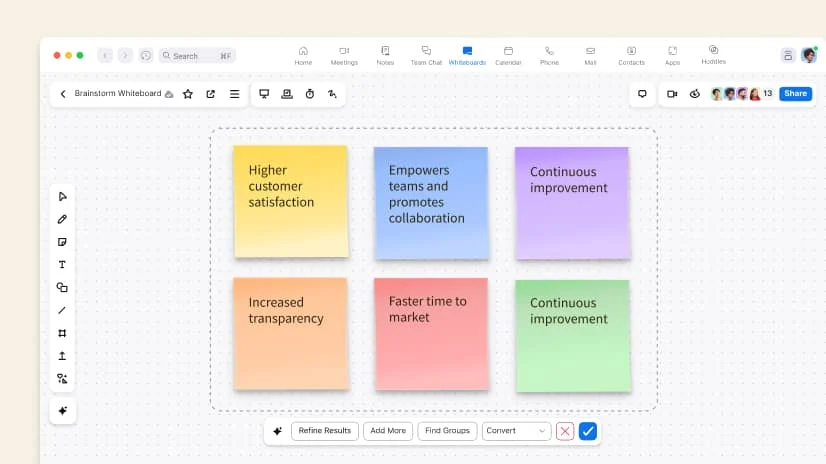
Whiteboard: Zoom’s collaborative whiteboard is genuinely good — sticky notes, drawing tools, AI content generation. Google Meet has a whiteboard integration (via Jamboard replacement), but it’s less polished.

Polls & Q&A: Zoom’s polls, Q&A, and surveys are well-integrated into the meeting flow. Google Meet has a Q&A panel but it’s more limited.
Bold take: If you run training sessions, webinars, or large team events, Zoom is the clear winner on meeting features. For standard team calls, the difference matters less.
4. AI Features: Both Have It, Zoom Includes It at Lower Cost
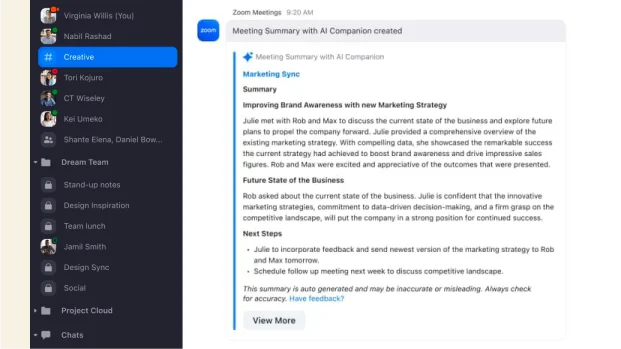
AI meeting tools are table stakes in 2026. The question is what they cost and what they actually do.
Zoom AI Companion 3.0 is included with paid Zoom plans (no extra charge). It generates meeting summaries, action items, live Q&A during meetings (“what did I miss?”), chat reply drafts, email drafts from meeting context, and whiteboard content.

Google Gemini in Meet gives you meeting notes, action items, and Q&A summaries — but only on Business Standard ($14/month) or higher. If you’re on Starter, no AI for you.

Both AIs do a solid job on meeting summaries. Zoom edges out for in-meeting “catch me up” features. Gemini integrates better if you’re already in Google Docs for note-taking.
5. Integrations: Zoom Isn’t Even Close
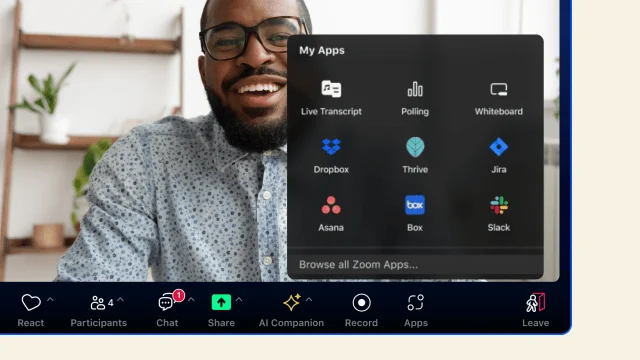
Zoom connects with 3,000+ third-party apps. Salesforce, HubSpot, Slack, Microsoft Teams, Notion, Asana, Zendesk, Dropbox — the list goes on. If your team uses tools outside Google’s ecosystem, Zoom probably integrates with them.
Google Meet’s integrations are solid within the Google ecosystem (Docs, Sheets, Calendar, Drive) but limited outside it. Google Calendar scheduling is genuinely excellent — one-click Meet links right from the calendar invite.
Reality check: If your company already standardized on Google Workspace, Meet’s integration story is actually great. You’re already inside the ecosystem. But if you’re mixing tools from multiple vendors, Zoom’s breadth wins decisively.
6. Security: Both Are Solid, Zoom Has Come a Long Way
Let’s address the Zoomboming elephant in the room. In 2020, Zoom had well-publicized security issues. In 2026, those are largely ancient history. Zoom now has:
- AES 256-bit encryption (end-to-end on most plans)
- Waiting rooms enabled by default
- Passcodes required by default
- SOC 2 Type II, ISO 27001, HIPAA compliance options

Google Meet benefits from Google’s security infrastructure — one of the best in the world. Zero extra configuration needed; security defaults are excellent. For many enterprises, that simplicity is a major advantage.
Verdict on security: Google Meet is slightly simpler to keep secure by default. Zoom is now enterprise-grade with the right configuration. Neither is a meaningful security risk for most organizations.
7. Ease of Use: Google Meet Wins for Simplicity

Google Meet is genuinely simple. Open Chrome, click a link, you’re in. No download required. The interface has very few controls. That’s intentional — and it’s the right call for most use cases.
Zoom has more controls, which means more power but also more friction. Hosts need to know about waiting rooms, breakout rooms, recording permissions, AI settings. There’s a learning curve.
For external meetings with clients, Google Meet is often better — no app download, no account required, lower friction. For internal team meetings with heavy collaboration features, Zoom’s power is worth the learning curve.
8. Noise Cancellation & Video Quality

Both tools offer AI-powered noise cancellation. In practice, both work well in typical office or home environments. Neither consistently outperforms the other on video quality at standard internet speeds.
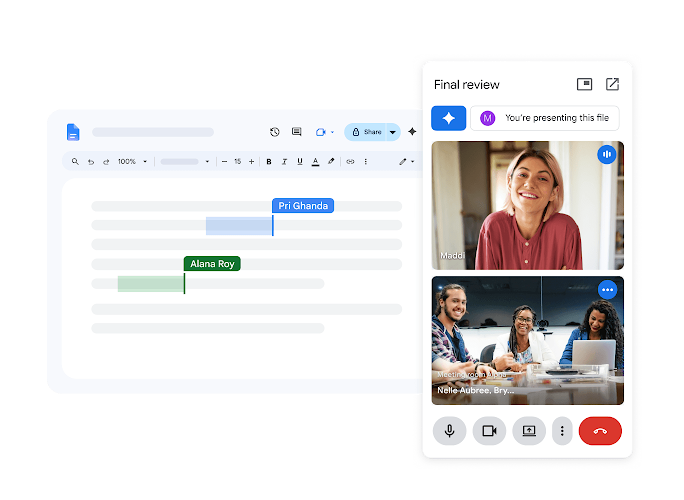
One area where Google Meet genuinely shines: in-meeting document collaboration. You can open a Google Doc, Sheet, or Slide directly in the Meet sidebar and edit together in real time without switching windows. Zoom doesn’t have a native equivalent.
Who Should Use Zoom?
Choose Zoom if you:
- Need more than 100 participants regularly
- Run webinars, training, or large team events
- Use tools outside the Google ecosystem (Salesforce, Slack, HubSpot)
- Need breakout rooms on a budget (Zoom Business vs Meet Business Standard are similar in price)
- Want local recording on the free plan
- Need translated captions for multilingual teams
Who Should Use Google Meet?
Choose Google Meet if you:
- Already use Google Workspace (Gmail, Drive, Docs, Calendar)
- Want lower-friction external meetings (no download required)
- Have a small team that doesn’t need advanced meeting features
- Want the cheapest entry price for a paid plan ($7/month)
- Prioritize in-meeting document collaboration
How They Stack Up: A Decision Guide
| Your Situation | Our Pick |
|---|---|
| You live in Google Workspace | Google Meet |
| You need 100+ participants | Zoom Business |
| You run webinars or training | Zoom |
| You want the cheapest paid option | Google Meet ($7/month) |
| You need 3rd-party integrations | Zoom |
| You want no-download client meetings | Google Meet |
| You need AI features on a budget | Zoom (AI Companion included) |
| Free plan for occasional calls | Google Meet (60-min limit) |
The Verdict
Here’s the honest call: Zoom wins on features. Google Meet wins on simplicity and ecosystem fit.
Zoom is the right pick if your team needs power — breakout rooms, webinars, 300-person calls, 3,000+ integrations, and AI tools included at no extra cost. It’s the enterprise-grade option that’s gotten genuinely good at everything.
Google Meet is the right pick if you’re already paying for Google Workspace (which most companies are) and your meetings are standard team calls and client check-ins. You don’t need another subscription. Meet is already there, it’s free, it works, and it keeps getting better.
If you’re still deciding, start here:
- Google Workspace team? → Google Meet
- Mixed tool environment, 10+ people, need power features? → Zoom
And if you’re comparing more tools, see our full breakdown of Slack vs Microsoft Teams — the other big communication showdown your team is probably already having.
Ratings sourced from G2 and Capterra (October 2026). Pricing verified from official vendor sites as of October 2026.
{
“@context”: “https://schema.org”,
“@type”: “Article”,
“headline”: “Zoom vs Google Meet: Which One Actually Wins in 2026?”,
“description”: “We compared Zoom and Google Meet on pricing, features, AI, integrations, and ease of use. Here’s the honest verdict for 2026.”,
“datePublished”: “2026-10-24”,
“dateModified”: “2026-10-24”,
“author”: {
“@type”: “Organization”,
“name”: “SoftwareCompareHQ”,
“url”: “https://softwarecomparehq.com”
},
“publisher”: {
“@type”: “Organization”,
“name”: “SoftwareCompareHQ”,
“url”: “https://softwarecomparehq.com”
}
}